
Wireless broadband networks often cannot keep up with more users. This happens because some big problems limit how much data they can handle. Control plane saturation, aggregation bottlenecks, interference, visibility gaps, outdated architectures, and weak security all cause trouble. These problems make broadband slower and upset people who use it. Broadband service providers lose business.
- Slow connections make customers less happy.
- Bad network reliability makes people trust it less.
Good solutions help networks get bigger and give better service.
Key Takeaways
- Wireless broadband networks have big problems like slow speeds and bad connections because of control plane saturation and interference. Network congestion happens when too many people use the same network, so the internet gets slower and people get upset. Old hardware and old designs make it hard for networks to keep up with new data needs, which causes delays and bad service. Checking networks often helps find problems early, so outages can be stopped and users stay happy. Good security is very important to keep networks safe from attacks, especially as more devices join and make things riskier. Spending money on new infrastructure, like fiber and microwave links, makes networks work better and helps them grow. Using automation and real-time analytics helps manage networks, so problems get fixed faster and everything works better. Managing interference before it happens keeps connections strong, so users get fast and steady internet.
Network Bottlenecks and Broadband Performance
Control Plane Saturation in Wireless Broadband Networks
Control plane saturation happens when the network’s control systems get too busy. This can happen if many devices try to connect at once. The network has to manage each device and keep track of them. It also needs to give out addresses. If the control plane cannot keep up, the whole network slows down. This makes it hard for the network to add more users. Delays happen when too many people try to join.
Some common network bottlenecks are:
- Network congestion happens when lots of people use the same resources. This makes speeds slow, especially when many people are online.
- Wireless interference comes from other electronic devices. These devices mess up signals and make connections less steady.
- Outdated network hardware cannot handle today’s data needs. Old equipment slows things down and makes the internet slower.
These problems make it tough for wireless broadband networks to grow. Users get slow speeds and lose connection often.
Aggregation and Queue Pressure
Aggregation and queue pressure change how data moves in the network. Aggregation means putting together data from many users before sending it. If too much data comes at once, queues form. Full queues cause delays and some data gets dropped.
The table below shows how different things affect throughput and latency:
| Aspect | Description |
|---|---|
| Queue Pressure Management | Managing queue pressure is important for better throughput and lower latency in wireless networks. |
| TCP BBR v2 Mechanism | BBR v2 changes how much data moves to match the network’s speed, which affects throughput. |
| Frame Aggregation Importance | In Wi-Fi 5 networks, frame aggregation helps get higher throughput, but slow pacing can hurt this. |
| Proposed BBR-n Enhancements | BBR-n manages data bursts better to improve throughput and lower latency compared to BBR v2. |
If aggregation and queue pressure are not handled well, the network gets slow. This causes high latency and slow internet. People notice these problems when videos stop to buffer or downloads take longer.
Impact on User Experience
Network bottlenecks do more than slow down broadband. They also make user experience worse. Slow internet makes people upset. High latency makes websites and apps feel slow. Bad connections can stop important work.
Just one second of delay on mobile can make conversion rates drop by 20%. Making websites faster improves the overall user experience.
A bad network hurts both users and businesses. Customers may switch to faster services. Companies lose online visibility, which means less traffic and fewer sales. That is why fixing network bottlenecks is important for good performance and business success.
Interference and Radio Environment Challenges
Proximity of Wireless Networks
Wireless broadband networks have trouble when many networks are close. When networks are near each other, their signals can mix. This mixing causes different kinds of interference. Co-channel interference happens if networks use the same channel. Adjacent channel interference happens if networks use channels that are next to each other. Devices like cordless phones and microwaves also cause interference. These things make the signal weaker and cause fading in wireless communication.
- Competing Wi-Fi networks
- Electronic devices like microwaves and Bluetooth
- Physical obstacles like concrete walls
These things make fading and path loss worse. Multipath propagation happens when signals bounce off things. The signal then gets to the receiver at different times. This makes fading and loss happen more often. The network cannot give strong connections when fading in wireless communication is high. Users get slower speeds and lose connection more often.
Signal Interference and SNR Issues
Signal interference is a big reason for bad wireless broadband. When interference goes up, the signal-to-noise ratio (SNR) goes down. A low SNR means the signal is weak compared to noise. This makes fading in wireless communication and path loss worse. Users get connections that are not steady and lose signal a lot.
A high SNR means the signal is better and there are fewer problems. Multipath and fading make it hard for the network to keep a good connection. Fading in wireless communication often happens when signals take many paths, called multipath propagation. This makes fading and loss happen more. Service providers use mitigation techniques to make SNR better and lower fading. They can change channels, move devices, or add repeaters.
Note: Knowing about SNR helps network managers find ways to make the signal better and lower fading in wireless communication.
Channel Congestion and Capacity Limits
Channel congestion stops a wireless broadband network from handling lots of data. When too many devices use one channel, the network gets crowded. This makes data move slower, latency go up, and packets get lost. Fading in wireless communication gets worse as more devices use the same channel.
Some things that cause channel congestion are:
- High device density
- Shared medium issues
- Bandwidth-heavy applications
- Old equipment
- Limited spectrum
Path loss and fading both get worse when congestion goes up. Multipath propagation also gets worse, so there is more loss. The network cannot help all users well when fading in wireless communication is high. Providers use mitigation and mitigation techniques to fix these problems. They might upgrade equipment, add more channels, or use smarter routing.
A crowded channel means more fading, more loss, and less steady service. Users see videos stop to buffer, downloads slow down, and connections drop. These problems show why interference and radio environment challenges make it hard for wireless broadband networks to keep up with demand.
Visibility Gaps in Network Management
Monitoring Limitations in Wireless Broadband Networks
Wireless broadband networks can have trouble with monitoring. This makes it hard to see all problems. Many groups set up their networks and do not check them often. They only look when something goes wrong. It is important to test networks often because things change. New devices, new layouts, and more traffic can cause signal fading. If teams do not check often, the network gets worse and quality drops.
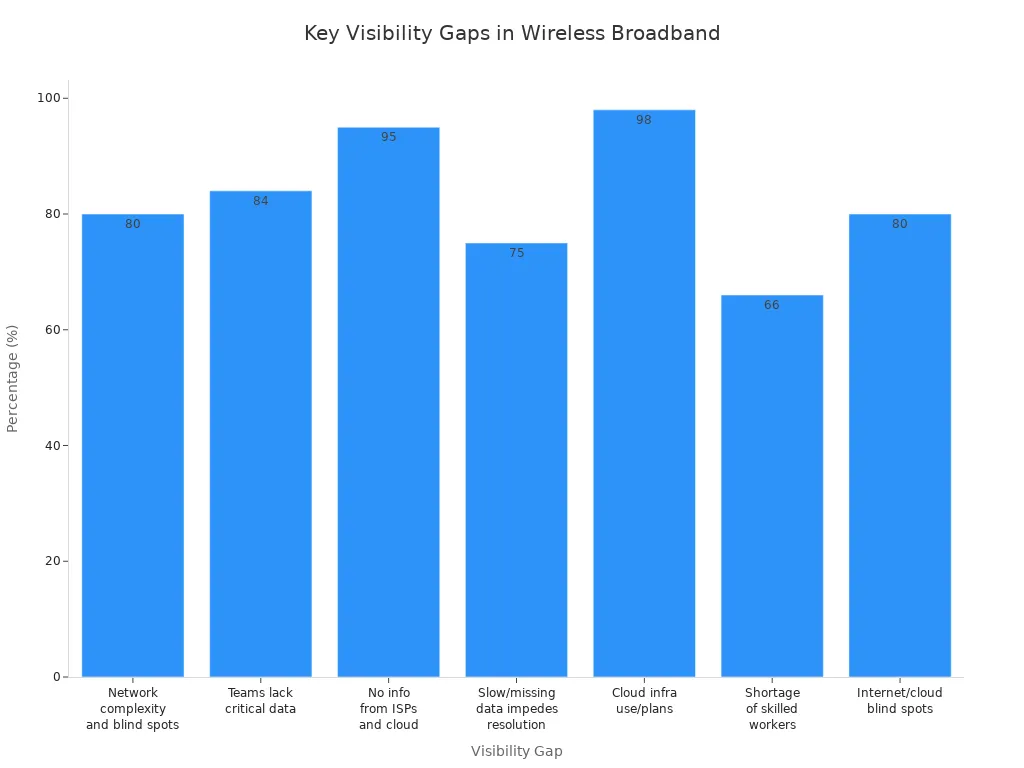
The table below shows how these gaps affect network management:
| Finding | Percentage |
|---|---|
| Organizations facing network complexity and visibility blind spots | 80% |
| Teams lacking critical data and learning about issues from users | 84% |
| Respondents not receiving necessary information from ISPs and cloud providers | 95% |
| Respondents feeling slow or missing data impedes resolution times | 75% |
| Companies using or planning to use cloud infrastructure | 98% |
| Respondents noting a shortage of skilled workers | 66% |
| Respondents stating internet and cloud environments create network blind spots | 80% |
Speed tests help teams find problems early. They can fix things before they get worse. If teams do not watch the network, signal fading and multipath effects are missed. This makes the network worse and causes more problems.
Missed Early Warning Signs
Missing early warning signs can cause service to stop working. Network problems can grow slowly over time. More devices and more traffic can make signal fading and multipath issues happen. If teams do not see strange traffic, outages can happen.
- Finding strange traffic early can stop outages.
- Fixing problems early makes troubleshooting faster.
- This lowers the time to fix things and keeps users happy.
Network problems can surprise teams. Sometimes, alerts do not show up when connections drop. This makes fixing things slower. Fading and multipath propagation get worse if teams miss warning signs. Quality drops and users trust the network less.
| Evidence | Explanation |
|---|---|
| Network problems develop gradually | Issues like added devices or increased traffic can lead to compounded problems if not monitored early. |
Impact on Service Quality
Visibility gaps hurt service quality. When teams do not have enough info, signal fading and multipath effects stay. Quality drops and users get slow speeds or lose connection.
Slow network performance leads to poor service quality. If networks have fading and multipath problems, quality drops significantly.
Companies lose customers when quality is bad. Users move to better networks. Teams need to watch for signal fading and multipath problems early. Better checks mean better quality and more trust from users.
Outdated Architectures and Manual Scaling
Legacy Wireless Network Constraints
Old wireless network architecture causes many problems today. These systems use hardware that cannot handle strong signals now. They have trouble with fading and multipath effects. These problems get worse when more devices connect. Old architecture makes upgrades slow and hard. When there is a lot of signal traffic, fading gets worse. Multipath propagation also causes more signal loss. The network cannot use new technology well. So, fading and multipath problems do not go away. This makes it hard for providers to give good broadband service.
Old systems do not have good tools to check signal quality. They miss early signs of fading and multipath problems. Because of this, users lose connection more and get slower speeds.
Manual Processes and Delayed Rollouts
Manual work slows down network growth. Teams must set up each device by hand. This takes a lot of time and costs more money. People can make mistakes when setting up devices. These mistakes can mess up signals and cause security problems. If the network uses manual setup, it cannot change fast. Fading and multipath effects get worse because the network cannot grow quickly. Providers wait longer to add new features or cover more areas.
- Manual work causes delays and higher costs.
- Mistakes hurt signal quality and make security weaker.
- Manual setup slows down network growth.
- Automated tools like Zero-Touch Provisioning make setup faster and easier.
When rollouts are slow, the network cannot keep up with more signals. Fading and multipath propagation get worse, so connections are not steady. Automated tools help by making setup faster and managing signals better.
Inflexible Service Plans
Service plans that cannot change stop broadband providers from growing. Old plans make businesses pay more for needed services. Providers cannot react fast to what users want. If service plans cannot change, fading and multipath problems stay.
Changing service plans helps providers fix signal quality and fading. It also helps meet user needs more effectively.
| Challenge | Impact on Network | Effect on Signal Quality |
|---|---|---|
| Legacy architecture | Slow upgrades | More fading and multipath |
| Manual scaling | Delayed rollouts | More signal loss |
| Inflexible service plans | Limited growth | Fading problems stay |
Backhaul and Coverage Gaps in Broadband
Bandwidth Limitations and Outages
Wireless broadband networks have trouble with bandwidth. The access network faces many problems that slow down data. Bandwidth limitations happen when too much traffic tries to move. Outages happen when parts of the network stop working. These problems cause signal fading and make connections weak.
Many things can cause bandwidth limits and outages. The table below lists common causes:
| Cause Type | Description |
|---|---|
| Hardware Failures | Old parts, broken pieces, or bad weather can break hardware. |
| Software Issues | Bugs or mistakes in software can crash the network. |
| Human Error | People can make mistakes or unplug things by accident. |
| Cyber Attacks | Hackers can attack with malware or DDoS and stop the network. |
| Natural Disasters | Earthquakes or floods can damage network equipment. |
| Power Failures | Power loss from blackouts or battery failure can shut down the network. |
| Capacity Overloads | Too many users or bad planning can make the network stop. |
| Third-Party Provider Issues | Problems with ISPs or cloud providers can cause outages. |
Signal fading gets worse when bandwidth is low. The access network cannot send strong signals. Users get slow speeds and lose their connection. Bandwidth problems make the network less steady.
Inaccurate Coverage Maps
Coverage maps show where the access network can reach. Sometimes, these maps are not right. Wrong maps make it hard for users to know if they get a good signal. The access network may say there is coverage, but fading and signal loss still happen.
Tip: Providers should update coverage maps often. This helps users find places with strong signals and less fading.
Service Gaps and Customer Retention
Service gaps happen when the access network cannot give a strong signal. Fading and signal loss make users upset. Customers leave when they get slow speeds and outages. The access network loses trust when service gaps grow.
- Bad customer service makes companies lose a lot of money every year.
- 59% of people leave their provider because of bad internet.
- Outages and slow speeds make more people leave and feel unhappy.
Signal fading and weak coverage push customers away. Providers need to fix service gaps to keep users. Strong signals and less fading help keep customers. Good service keeps users happy and helps the business do better.
Security and Scalability Risks
Weak Security Settings in Wireless Broadband Networks
Wireless broadband networks can have weak security settings. Attackers look for easy ways to get in. They use tricks like IP and MAC spoofing to pretend to be trusted devices. DNS cache spoofing sends users to fake websites. Rogue access points let attackers steal user traffic and information. These problems happen more when routers and access points use old software or default passwords.
Many networks do not use strong security controls. They may skip multifactor authentication, so attackers can take over accounts. Some networks use weak passwords or leave ports open. Others do not patch their software, so attackers find holes and get inside. Poor settings on cloud services can lead to data theft. These weak spots make it easy for attackers to cause trouble.
| Security Risk | Description |
|---|---|
| Vulnerabilities in routers | Routers and access points are often targeted by malware. |
| IP and MAC spoofing | Attackers pretend to be trusted devices to get into the network. |
| DNS cache spoofing | Attackers redirect users to fake websites. |
| Rogue access points | Fake access points capture user traffic and steal data. |
| Deauthentication attacks | Attackers disconnect users from the network, causing disruptions. |
Tip: Update software and use strong passwords to protect the network from attacks.
Vulnerabilities with Growing Device Counts
More devices connecting to wireless broadband networks brings new risks. Each device can be a weak spot if it does not have good security. Attackers use weak or hardcoded passwords to break into devices. Insecure networks let attackers steal data by listening to signals. Poorly protected APIs and apps can let attackers in if they do not check who is using them.
Many devices use old software or do not get updates. This makes it easy for attackers to install harmful code. Some devices do not protect privacy well, so user data can leak. Devices with default settings are easy targets. If teams do not manage devices well, attackers can get into the network and cause fading or signal loss.
| Vulnerability Type | Description |
|---|---|
| Weak/hardcoded passwords | Attackers use these to control devices and launch attacks. |
| Insecure networks | Attackers can steal data by listening to the signal. |
| Insecure update mechanisms | Devices can get harmful updates if not protected. |
| Insecure default settings | Default settings make devices easy to attack. |
| Improper device management | Poor management lets attackers access the network. |
Note: Good device management and regular updates help keep the network safe as more devices connect.
Complications for Scaling and Trust
Security and scalability problems make it hard for wireless broadband networks to grow. If networks do not have strong security, users lose trust. People worry about their data and privacy. New networks like 5G can make privacy concerns worse. If attackers break in, they can cause outages or slow down the signal. This leads to more fading and poor connections.
As more devices connect, the network must handle more traffic. If security is weak, attackers can overload the network and cause service disruptions. Users want reliable connections and safe data. If they do not trust the network, they may switch to another provider. Providers must fix security and scaling issues to keep users and protect the signal.
- Security keeps users safe from cyber threats.
- Scalability helps the network grow and stay reliable.
- Trust depends on both strong security and good performance.
Providers who fix these problems can offer better service and keep users happy.
Solutions for Scalable Wireless Broadband Networks
Investing in Modern Infrastructure
Modern infrastructure helps wireless broadband networks solve many problems. Providers use fiber and microwave links to make networks stronger. Fiber gives fast core links and high-speed access. Microwave links work as backup if fiber breaks. This keeps the network working and reliable. Microwave technology lets new sites connect quickly. Fiber helps the network grow over time and supports more users.
The table below shows how these upgrades help broadband:
| Benefit | Description |
|---|---|
| Enhanced Redundancy & Availability | Microwave links back up fiber, so service stays on. |
| Optimized Performance & Cost | Fiber is for main links, microwave is for last-mile, which saves money and works well. |
| Strategic Flexibility | Microwave connects new sites fast, fiber helps long-term growth. |
Providers use new technology to get speeds like fiber. High capacity and multi-gigabit speeds make broadband faster. Fast and cheap setup helps networks grow without waiting. Scalable design lets networks get bigger as more people join. Carrier-grade reliability keeps the network strong even in tough weather. Big projects, like Reliance Jio, show these ideas work well.
- High capacity and fast speeds help users get better access.
- Quick setup means less downtime and keeps the network always on.
- Scalable design helps the network grow in the future.
Modern infrastructure gives wireless broadband networks what they need to handle more users and data. This makes the network stronger and ready for big growth.
Automation and Real-Time Analytics
Automation and real-time analytics change how networks work. AI-driven maintenance finds problems before they hurt service. Automated traffic management makes things run better and lowers delays. Providers use automated tools to update many devices at once. This cuts down on mistakes and saves time when setting up.
Backup scheduling helps the network recover fast from outages. Real-time alerts with root cause help IT teams fix problems before users notice. The network saves old data, so teams can learn from it later. Instant alerts for hacks and weak spots keep the network safe.
- AI-driven maintenance makes the network more reliable and strong.
- Automated updates make setup faster and lower mistakes.
- Real-time analytics help teams fix problems quickly.
Smarter traffic management lowers delays when lots of people use the network. Automation helps the network work better and makes customers happier. Providers use these tools to build networks that can change as needed.
Proactive Interference Management
Proactive interference management helps networks stay strong and steady. Providers use smart algorithms to spot interference patterns. These algorithms change how signals are sent to work better in busy places. Dynamic channel allocation checks the radio spectrum and picks channels with less interference.
The table below shows good ways to manage interference:
| Strategy | Description |
|---|---|
| Adaptive algorithms | Find interference patterns and change how signals are sent to work better in busy places. |
| Dynamic channel allocation | Watch the radio spectrum and pick channels with less interference for better performance. |
| Time-division protocols | Set up timing so signals do not crash into each other and lower interference. |
| Spatial diversity techniques | Use more antennas and beamforming to make signals better and cut down interference. |
| Cognitive radio technologies | Change how signals are sent based on interference and channel conditions. |
Time-division protocols set up timing so signals do not crash. Spatial diversity uses more antennas and beamforming to make signals stronger. Cognitive radio changes how signals are sent when interference or channel conditions change.
- Smart algorithms and dynamic channel allocation keep the network strong.
- Time-division and spatial diversity lower interference and make broadband better.
- Cognitive radio makes the network flexible and ready for new problems.
Proactive interference management helps wireless broadband networks give steady service. These ideas help providers keep access strong, lower problems, and support growth.
Strengthening Security for Growth
Wireless broadband networks have more risks as they get bigger. Attackers search for weak spots when new devices join. Strong security helps networks add more users and keep data safe. Providers need to know why security is important for growth.
Security stops attackers from causing outages or stealing data. If networks do not have good protection, users lose trust. They might leave and pick a safer network. Providers must show they care about privacy and safety. This helps build trust and lets the network grow.
There are many ways to keep networks safe as they get bigger:
- Segment Wi-Fi users and devices by SSID. This lets providers use different security rules for each group. Old devices may need other protections than new ones.
- Create a guest Wi-Fi network. A separate SSID for guests keeps the main network safe. Guests cannot get to important business data.
- Adjust access point power levels. Lowering the signal stops the network from reaching too far. This keeps attackers from connecting outside.
- Detect rogue access points. Monitoring tools find fake or bad access points. Providers can remove these threats fast.
- Use 802.1x authentication instead of shared passwords. This gives each user their own login. It lowers the chance of password leaks.
- Secure LAN switchports. Good settings stop people from plugging in unknown devices.
- Use external security tools. VPNs and AI-powered tools find threats early and keep data safe.
- Follow standard security practices. Firewalls, updates, and teaching users protect the network from attacks.
Providers who use these steps lower attack risks. They also make it easier to add new users and devices.
The table below shows how each practice helps networks grow:
| Security Practice | How It Supports Growth |
|---|---|
| SSID Segmentation | Allows flexible security for many device types |
| Guest Wi-Fi | Keeps business data safe while serving more users |
| Power Level Adjustment | Reduces outside threats as coverage expands |
| Rogue AP Detection | Stops hidden threats before they spread |
| 802.1x Authentication | Makes adding users safer and easier |
| Secure Switchports | Blocks unauthorized devices as the network grows |
| External Security Tools | Finds and stops attacks in real time |
| Standard Security Practices | Keeps the network strong as it gets bigger |
Networks that grow without strong security get attacked more and lose users. Providers who spend money on security can grow with confidence. They protect their name and keep customers happy. Security is not just a tech thing—it is a big part of network growth.
Wireless broadband networks have problems like bottlenecks, interference, not seeing issues, old systems, and weak security. Providers can fix these problems by using modern tools. The table below lists companies that made their service better with new technology:
| Company | Solution | Region |
|---|---|---|
| Nutrien | Cisco Wireless, Ultra-Reliable Backhaul | Americas |
| Vulcan | Cisco Meraki Dashboard, SD-WAN appliances | APJC |
| DP World | Cisco Software-Defined Access, Catalyst Center | APJC |
Providers should try to grow and keep customers happy.
FAQ
Why do wireless broadband networks slow down during peak hours?
A lot of people go online at the same time. The network gets crowded. Devices fight for bandwidth. Internet speeds get slower. People see videos buffer and things take longer to load. Providers need to upgrade their systems to handle more users.
Why does interference affect wireless broadband performance?
Nearby devices and networks send signals that mix together. This mixing causes interference. The signal gets weaker. People lose their connection or have slow speeds. Providers use channel management to help stop interference.
Why do outdated network architectures limit scalability?
Old systems cannot work with new technology. They do not have modern features. Upgrades take more time. Providers have trouble adding more users. Networks are not as steady. Using new infrastructure helps networks grow.
Why is visibility important for network management?
Visibility lets teams find problems early. If they do not watch, problems get worse. Service gets bad. People stop trusting the network. Providers use real-time analytics to fix things fast.
Why do security weaknesses increase risks as networks grow?
More devices join the network. Attackers find new weak spots. Data can get stolen and outages can happen. Providers need to make security stronger. Good security keeps users safe and builds trust.
Why do inaccurate coverage maps hurt customer satisfaction?
Maps show where service should work. If maps are wrong, people get weak signals. People get upset. Customers leave for better networks. Providers update maps to show where service really works.
Why do manual processes delay network rollouts?
Manual setup takes a long time. Teams can make mistakes. Upgrades are slow. Networks cannot grow quickly. Automated tools help set up faster and make fewer errors.
Why does channel congestion limit wireless broadband capacity?
Too many devices use one channel. Data moves slowly. Latency goes up. Some data gets lost. Providers add more channels and use smarter routing to fix this.