Good spectrum and backhaul planning helps everyone get steady fixed wireless access. People want their connections to always work well. Many teams have trouble with signal interference, fading, and network crowding when they start Coverage Planning. Bad weather can also make things worse, so careful planning is very important. Teams need to think about how things are set up and how they work every day to stop service problems and expensive errors.
Key Takeaways
- Reliable fixed wireless access (FWA) keeps people happy. It also helps stop people from leaving the service. A strong connection is needed for work, school, and fun.
- Businesses can lose a lot of money if FWA is not reliable. Even short outages can cost thousands of dollars every minute.
- Good spectrum planning is very important. Teams must pick the right frequency bands. This helps stop interference and keeps connections steady.
- Backhaul capacity affects how users feel about the service. Teams should match backhaul strength to how much data people will use. This helps stop slow speeds.
- Weather and other things in the environment can cause problems for FWA networks. Teams must think about weather and obstacles when they plan coverage.
- Money limits affect every part of FWA planning. Teams should make clear budgets. They should pick technologies that fit their money limits.
- Testing and watching the network often helps find weak spots. Teams should change their plans as user needs and technology change.
- Making networks ready for the future is very important. Teams should build systems that can grow and change as more people use them over time.
Reliability in FWA
User Experience Impact
Reliability affects how people feel about fixed wireless access every day. If the connection drops or gets slow, people get upset. They might even change to another provider. Reliable FWA keeps people happy and makes them want to stay. The table below shows what makes people leave the service:
| Factor | Impact on Churn |
|---|---|
| Fiber | High |
| Sales Zone | Moderate |
| Age | Moderate |
| Speed | High |
| Discounts | Variable |
Speed and fiber are the biggest reasons people stay or go. If the network is slow or stops working, people look for something better. Reliable FWA helps people trust the service for work, school, and fun. Good connections also help with new things like cloud apps and smart devices.
Business Implications
Businesses need reliable FWA to work every day. Even short breaks in service can cause big trouble. The table below shows what can happen with money if FWA is not reliable:
| Financial Consequence | Description |
|---|---|
| Direct Revenue Loss | Businesses can lose a lot of money when the internet goes out, from $137 to $9,000 each minute. |
| Operational Overhead Expenses | Costs go up because workers can’t work, IT has to fix things fast, and there may be extra fees. |
| Intangible Brand Reputation Damage | If the internet goes out a lot, customers stop trusting the company and may choose someone else. |
| Productivity Plummet | When the internet is down, people can’t use important tools, so work gets messed up and mistakes happen. |
Reliable FWA helps businesses keep working without problems. It lets them use cloud systems, automation, and important jobs. Companies save money and keep a good name by picking networks that work well.
Compliance Factors
Some places have rules for networks to follow. Reliable FWA helps companies follow these rules and not get fined. For example, some places need strong uptime for emergency services or public safety. Reliable networks also keep data safe and help people talk securely.
How the network is built is important for meeting these rules. Teams pick equipment that works in bad weather and plan for low delays. They might add backup links or use more spectrum layers to keep the network working during storms or busy times. These steps help networks follow the rules and get ready to grow.
Tip: Teams should check local rules before building or changing FWA networks. This makes sure the network is safe and legal.
Spectrum and Backhaul Challenges
Spectrum Scarcity & Interference
Teams often have trouble finding enough spectrum for FWA networks. Many providers want to use the same frequencies. This can cause interference. Interference makes service quality worse and connections less steady. In cities, the problem is bigger because more devices use the airwaves. In rural places, there are fewer users, but not much spectrum.
Interference comes from many things. Other wireless networks and home electronics can cause it. Even weather can make interference happen. Teams must pick the right frequency bands. They also need smart channel planning to help stop problems. Filters and antennas can block bad signals. Good planning keeps the network strong and steady.
Backhaul Capacity Limits
Backhaul capacity is how much data the network can move. If backhaul is weak, users get slow speeds and dropped connections. Teams must match backhaul to how much people will use. Fiber optic backhaul can carry the most data and works well in cities. In rural areas, teams may use microwave or satellite links.
Key points about backhaul capacity limits:
- Backhaul capacity is very important for growing FWA.
- Fiber optic backhaul helps high-capacity wireless networks.
- More data means stronger backhaul is needed.
- Old designs and high costs can slow new networks.
The table below shows rural and urban backhaul needs:
| Aspect | Rural Environments | Urban Environments |
|---|---|---|
| Required Edge Nodes (EN) | 75 ENs per km² | 300 ENs per km² |
| Impact of Rain on Coverage | Reduces by 5% | Reduces by 8% |
| Impact of Vegetation | Reduces by 10% | Reduces by 3% |
Rural teams use microwave, satellite, and unlicensed backhaul. Urban teams use more fiber and 60GHz links. Both need good planning to stop bottlenecks.
Environmental Barriers
Nature can hurt FWA networks in many ways. Heavy rain and humidity slow down wireless signals. Snowstorms and freezing weather can break outdoor equipment. Solar flares can also cause interference.
Common environmental barriers include:
- Bad weather hurts speed and stability.
- Heavy rain and humidity slow connections.
- Cold weather can break cables and hardware.
- Rain and snowstorms make cellular signals weaker.
- Solar flares can cause interference.
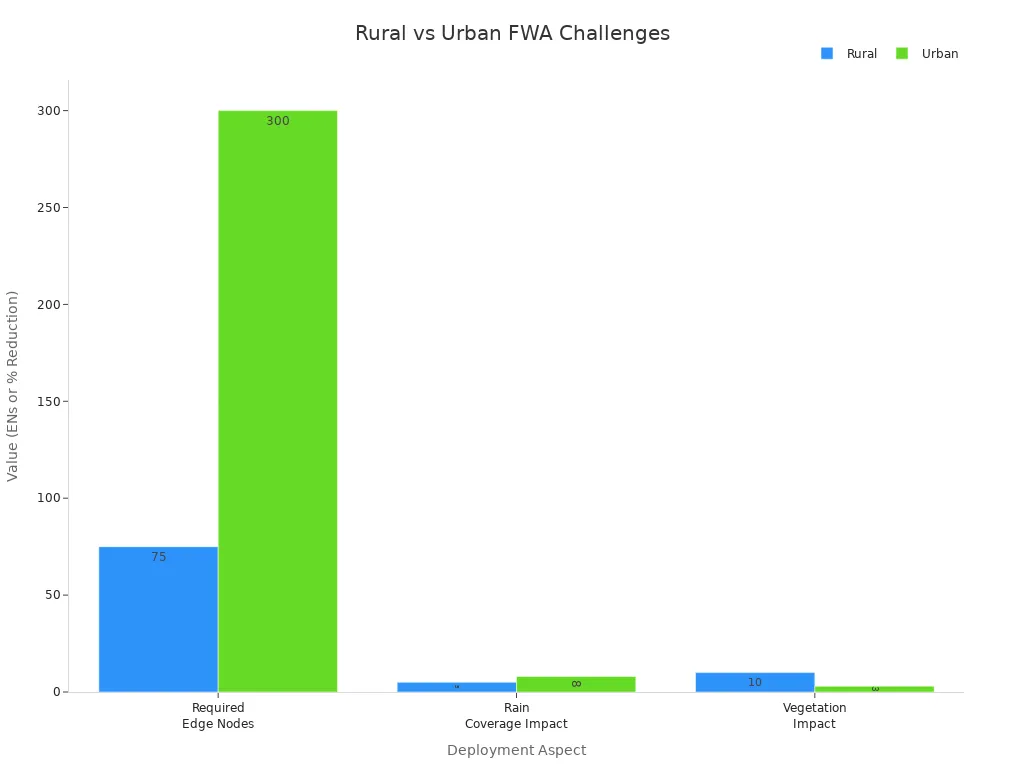
Rural areas have more trouble with rain and plants. Rain can cut backhaul distance by 18% in rural places. In cities, rain cuts it by 8%. Plants block signals more in the countryside. Teams must check the local area and pick equipment that can handle these problems.
Tip: Teams should test their network in all kinds of weather and seasons. This helps them find weak spots and fix them before users have problems.
Cost Constraints
Cost constraints affect every part of spectrum and backhaul planning for fixed wireless access (FWA). Teams must think about what they want and what they can pay for. They have to make smart choices to keep networks strong and not spend too much.
Most teams deal with three main cost constraints. The table below shows these constraints and what they mean:
| Constraint Type | Description |
|---|---|
| Time | Connecting end devices to the network in a timely manner. |
| Budget | Maintaining budgetary frameworks during planning. |
| Complexity | Reducing complexity to keep networks and services manageable. |
Time is a cost because waiting too long costs more money. If teams are slow to connect users, they might lose customers. Fast work helps companies start making money sooner. Teams set clear schedules and check their progress to avoid delays.
Budget means teams can only spend a certain amount. They need to plan for equipment, workers, permits, and repairs. Some things, like spectrum licenses or fiber, can cost too much. Teams compare different ways to build the network to save money. For example, they might use microwave links instead of fiber in faraway places.
Complexity makes things cost more in hidden ways. Complicated networks need special workers and tools. If the network is too hard to understand, it takes longer to fix problems. Teams try to keep things simple. They use the same equipment and easy layouts. This helps lower training costs and stops mistakes.
To handle cost constraints, teams can do these things:
- Set a clear budget: Write down all costs before starting. Think about equipment, setup, permits, and upgrades.
- Choose the right technology: Pick solutions that fit the budget and coverage needs. For example, use unlicensed spectrum to avoid high fees.
- Plan for growth: Build networks that can get bigger without spending a lot more. Modular designs help teams add more users later.
- Monitor spending: Watch costs during the project. Change plans if things get too expensive.
Note: Teams should always look for hidden costs, like repairs or license renewals. These can add up and hurt the project later.
Cost constraints do not just matter at the start. They also change how teams take care of and grow networks later. Good planning helps teams give reliable FWA service without spending too much money.
Coverage Planning Steps
Good Coverage Planning helps teams give strong fixed wireless access. There are three main steps in this process. First, teams define the service area. Next, they map the infrastructure. Last, they find any gaps. Each step makes sure the network works well and can grow later.
Define Service Area
Teams begin by deciding where the service will go. They look at where people live and work. If many people are close together, they need strong connections. If people are spread out, signals must go farther. Teams follow these steps to define the area:
- Teams do a site survey. They check how strong the signal is. They look for things that block signals, like buildings or trees.
- Teams pick where to put customer equipment. They choose spots with a clear view of the base station.
- Teams put the equipment high up. This keeps the signal strong.
- Teams connect the equipment to the network inside the building.
- Teams set up the equipment to talk to the provider’s base station.
- Teams test the connection. They check if it is fast and steady.
- Teams watch the system for problems. They upgrade when needed.
Teams also think about how the network will work every day. They check if there is a clear line of sight from the user to the tower. They think about how much data people will use. They look at service agreements to make sure the network meets uptime and support needs. Teams also plan for safe and secure connections.
Tip: Teams should always look for things that block signals. Weather like rain or snow and buildings can make coverage worse.
Map Infrastructure
After picking the service area, teams map what is already there. They look for towers, rooftops, and fiber lines. They check what equipment is in place. This helps teams use what they have and not spend extra money.
Here is a table with important things to think about:
| Consideration | Description |
|---|---|
| Line of Sight (LoS) | Needs a clear path between the receiver and the tower. |
| Uptime Requirements | Some users need the network to work all the time. |
| Data Usage Needs | High data use means stronger equipment and more planning. |
| Installation & Equipment | Teams must know what equipment and setup costs are included. |
| Service Level Agreements | Teams check for promises about speed and support. |
| Network Security | Secure setup keeps user data safe. |
Teams also look for things that can cause interference. Other networks, home electronics, and weather can make problems. Teams mark these risks on their maps.
Identify Gaps
The last step is to find gaps in the network. Teams look for places where the signal is weak or missing. They check for crowded areas that slow down the network. They also look for old or missing equipment.
Some common problems are:
- Signal interference from other networks or things in the way.
- Weather problems, like rain or snow, that make signals weaker.
- Network congestion in busy places.
Teams use this information to fix weak spots. They might add more towers or upgrade equipment. They can also change the network layout. Teams plan for new users and technology by leaving space for growth.
Note: Teams should test the network in different seasons and times of day. This helps them find hidden problems and keep the network strong.
Coverage Planning is not done just once. Teams must check and update their plans as things change. Regular checks help keep the network working well and ready for new needs.
Spectrum Selection
Picking the right spectrum is very important for a strong FWA network. Teams need to look at frequency bands. They also plan channels and handle interference. This keeps connections working well.
Frequency Band Choices
The best frequency band depends on where people live. Teams think about buildings, trees, and weather. These things can block or weaken signals.
The study looks at what is needed to plan an FWA network. It shows how to reach 99% user connectivity for people who want up to 1 Gbps. This is for both cities and the countryside. The study says buildings, plants, and rain are important. These things change how signals travel. They help teams pick the right frequency bands.
Licensed vs Unlicensed
Teams can use licensed or unlicensed bands. Licensed bands cost more money. They protect better from interference. Unlicensed bands are cheaper but can get crowded. Teams must choose between saving money and having a strong network.
| Frequency Band | Coverage Type | Key Benefits |
|---|---|---|
| Mid-band (1-6 GHz) | Suburban/Rural | Broad coverage, larger cell sites |
| mmWave | Dense Urban | High-capacity, low-latency |
Mid-band works well in suburbs and the country. It covers big areas and needs fewer towers. mmWave is best for cities. It gives fast speeds but covers small spaces.
Using both mmWave and mid-band C-band makes the network stronger. Mid-band gives good coverage in the country and suburbs. mmWave works well in busy city places. This helps the network work its best and keeps service good.
60 GHz and mmWave
The 60 GHz band and other mmWave bands give very fast speeds. These bands work best when there are not many things in the way. Teams use them for short links in cities or special high-speed jobs. Rain and buildings can block these signals. Teams must check the area before picking mmWave.
Channel Planning
Channel planning helps stop interference and makes the network better. Teams pick the right channels and spread them out.
- Teams plan coverage and how much data the network can handle.
- Channel planning helps stop interference.
- The size of the band and how it is split changes speed.
- Good channel planning lets more people use the network.
Teams use tools to map out channels. They make sure towers close to each other do not use the same channel. This keeps the network fast and strong.
Interference Management
Managing interference keeps the network working well. Teams must find and fix things that cause interference.
| Strategy | Description |
|---|---|
| Identify Sources of Interference | Teams check the spectrum to find things like microwaves and cordless phones that cause problems. |
| Optimize Access Point Placement | Teams make sure access points are not near things that cause interference. |
| Create a Channel Plan | Teams make a plan so close access points do not use the same channel. This stops co-channel interference. |
| Manual Channel Selection | In busy places, teams pick channels by hand to stop interference and keep speeds high. |
Teams test the network often. They move equipment or change channels if they find problems. Careful spectrum picking and planning help teams build FWA networks that work well everywhere.
Backhaul Options
Fiber Backhaul
Fiber backhaul gives FWA networks a strong base. Teams pick fiber when they need very fast speeds and low delay. Fiber can move lots of data, even as the network gets bigger. This makes fiber a great choice for busy cities or places with many users.
The table below shows the main good and bad things about fiber backhaul:
| Advantages | Disadvantages |
|---|---|
| Extremely high speed and capacity | Expensive to deploy, especially in remote areas |
| Low latency | Time-consuming installation process |
| Can handle increased data traffic as network grows | N/A |
Teams use fiber when they want the best network. They plan where to put fiber to avoid long waits during setup. In the countryside, fiber can cost a lot and take a long time to build. Teams must see if fiber is worth the money and time.
Tip: Teams should look for fiber lines that are already there before building new ones. Using old lines can save money and time.
Microwave & mmWave
Microwave and mmWave backhaul give teams flexible ways to connect sites. Microwave systems now support fast speeds and low delay. These systems work well for 5G and new FWA networks. Teams can use higher bands, like V-Band and E-Band, to get very fast speeds.
mmWave gives even more bandwidth. It helps teams give fast internet in crowded cities. But mmWave signals can get weak in bad weather, like heavy rain. Teams use new tools to fix these problems. They pick strong outdoor units and plan smart to stop interference.
Teams pick microwave or mmWave when fiber costs too much or takes too long. They set up links fast and change them as the network grows. These options help teams reach more users without waiting for big builds.
Unlicensed Spectrum
Unlicensed spectrum lets teams build backhaul links without buying costly licenses. Many small providers used unlicensed bands for rural FWA before. These bands help teams start service fast and for less money.
But unlicensed spectrum has some limits:
- More risk of interference, especially in 5 GHz and 2.4 GHz bands
- Shorter range, especially in 60 GHz and 80 GHz bands
- Not as reliable as fiber or microwave
- More people using the same spectrum
- Not good for very high bandwidth needs
Teams must check if unlicensed spectrum fits their goals for coverage and reliability. They often use it for short links or as backup. As more people use these bands, interference and crowding can get worse. Teams should test the network often and plan upgrades if more users join.
Note: Teams should always think about cost, speed, and reliability when picking a backhaul option. The best choice depends on the area, what users need, and future plans.
Capacity & Latency
Capacity and latency are important for backhaul planning. Teams must know both to build a good network. Capacity is how much data the network can move. Latency is how fast data travels between places. Both affect how people use the network and how businesses work.
High capacity lets many people stream videos and play games. Low latency keeps video calls clear and games smooth. Some new things, like self-driving cars and live streaming, need very low latency. Teams must pick backhaul that fits these needs.
The table below shows why bandwidth and latency matter:
| Requirement | Description |
|---|---|
| Bandwidth | Needed for sending data; 5G uses much more. |
| Latency | Needed for things like self-driving cars and live streaming; low latency is important. |
Teams should check how much bandwidth users need now and later. 5G and new devices use more data than old ones. If backhaul is not strong enough, users get slow speeds and dropped connections. Teams should also test latency. High latency can ruin live apps, like video calls and games.
Fixing latency problems is very important for cable networks. Teams use new technology and smart settings to meet needs. They might use fiber for the lowest latency and highest capacity. If fiber is not possible, teams use microwave or mmWave links with special settings to lower latency.
Key steps for teams to manage capacity and latency:
- Measure data needs now and later.
- Test latency at different times.
- Pick backhaul that fits both needs.
- Use tools to watch for slowdowns.
- Upgrade links when more people join.
Tip: Teams should plan for more users. Picking backhaul with extra capacity helps stop problems as the network grows.
Teams should also think about weather and distance. Rain or long distances can slow some wireless backhaul links. Fiber works best for high capacity and low latency, but it costs more. Microwave and mmWave links work well for short distances and cost less.
By checking capacity and latency early, teams can pick the best backhaul. This keeps the FWA network strong, fast, and ready for new technology.
Redundancy & Future-Proofing
Multiple Backhaul Links
Teams can make FWA networks more reliable by using more than one backhaul link. When they add extra links, the network does not stop working if one link fails. This setup helps keep users online during repairs or outages. Teams often use fiber as the main link and microwave or cellular as backup. They choose backup links that work well in bad weather or when the main link is busy. This approach gives users steady service and helps businesses avoid downtime.
Tip: Teams should test backup links often. Regular checks make sure backups work when needed.
Load Balancing & Failover
Load balancing and failover help networks stay strong and fast. Teams use load balancing to spread network traffic across all links. This keeps any one link from getting too busy. It also helps the network run smoothly, even when many people use it at once.
Failover means the network switches to a backup link if the main one stops working. This switch happens automatically. Businesses can keep working, and users do not notice a problem. Cellular internet often serves as a backup because it is quick to set up and does not cost much.
Key benefits of load balancing and failover include:
- Load balancing spreads traffic and keeps connections steady.
- Automatic failover gives a backup if the main link fails.
- Cellular backup adds extra strength to the network.
Teams should set up both features to keep FWA networks reliable. They should also check these systems often to make sure they work well.
Network Growth
Teams must plan for network growth from the start. They design networks that can handle more users and devices over time. This process is called future-proofing. Teams use several strategies to make sure the network can grow.
| Strategy | Description |
|---|---|
| Scalability | Teams build networks that can add more users and devices as needed. |
| Uptime Design | They use failover, load balancing, and quality rules to keep service strong. |
Other steps for future-proofing include:
- Teams match their plans to new network needs.
- They consider using 6 GHz bands for more capacity.
- They check if switches support Power over Ethernet (PoE).
- They upgrade switch port speeds when needed.
- They add location tools for smart buildings and IoT.
Note: Teams should review their network plans every year. Regular updates help networks stay ready for new technology and more users.
By following these steps, teams can build FWA networks that last. They keep service reliable and make it easy to add new features in the future.
Best Practices Checklist
Action Steps
- Teams need to use spectrum in a smart way. This helps stop interference and makes bandwidth better. Licensed spectrum gives a steady network. It also keeps outside signals from causing trouble.
- Good backhaul links are needed to connect FWA networks to the internet. Teams must check if backhaul can handle all the data.
- Coverage Planning should always have a full site survey. Teams look for things that block signals, check signal strength, and find what causes interference.
- Teams should pick the right backhaul for each place. Fiber is best in cities. Microwave or unlicensed radio works well in rural or suburban areas.
- Teams should test and watch the network often. This helps them find weak spots before users have problems. Plans should change as the network gets bigger.
Tip: Teams should always think about future growth when planning coverage. This keeps the network strong as more people join.
Pitfalls to Avoid
- Teams should not try to sell service everywhere without checking the market first. Splitting the market the right way saves money and time.
- Sellability mapping must check signal quality, sector loading, and if backhaul is ready. If teams skip these, service can be bad.
- Strong radio signals do not fix weak or crowded backhaul. Users will still get slow speeds or dropped connections if backhaul is not good enough.
- Teams should not skip regular network checks. Problems can get worse if not found early.
Note: Teams should remember to check both radio and backhaul when planning coverage.
Planning Tools
Many teams use special tools for Coverage Planning. These tools use radio models to show where to put base stations. They also show how much data the network can handle. Simulation tools let teams test ideas before building the network.
Common choices for spectrum and backhaul are:
- Fiber optic backhaul for fast speed and low delay in cities.
- Microwave backhaul for quick setup and long range in suburbs and rural places.
- Unlicensed band radio for fast, cheap setup in rural areas.
- Satellite backhaul for faraway places where other options do not work.
Teams also look at the best frequency bands, antenna types, and power amplifiers. They pick parts that fit their network and budget.
Teams should check their tools and technology every year. This helps the network stay ready for new problems and growth.
Teams that plan spectrum and backhaul well make FWA networks work better. They pick the best frequency bands for their area. They look at what equipment is already there and find places that need more help. Using licensed spectrum and smart technology, like XCIEN, can save money and make the network faster. Planning ahead helps teams cover more places, keep the network strong, and spend less money. Many case studies show this works.
| Benefit | Description |
|---|---|
| Improved reliability | Good planning means less downtime and happy users. |
| Cost efficiency | Smart choices help teams save money and grow networks. |
Teams can learn more about making networks bigger and using automation. Now is a good time to start planning for strong FWA coverage.
FAQ
What is the first step in planning FWA coverage?
Teams start by defining the service area. They check where people live and work. They look for obstacles like buildings or trees. This helps them decide where to place equipment.
How do teams choose the right spectrum for FWA?
Teams compare licensed and unlicensed bands. They look at cost, interference, and coverage needs. Licensed bands offer more protection. Unlicensed bands cost less but may have more interference.
Why does backhaul matter for FWA reliability?
Backhaul connects the FWA network to the internet. Strong backhaul means fast, steady service. Weak backhaul causes slow speeds and dropped connections. Teams pick fiber, microwave, or unlicensed links based on location.
How can teams reduce interference in FWA networks?
Teams use channel planning and smart placement of equipment. They avoid using the same channels on nearby towers. They test for interference and adjust settings as needed.
What should teams do if the network grows?
Teams design networks that can add more users. They use modular equipment. They plan for extra capacity. Regular reviews help them upgrade before problems start.
How do teams handle bad weather or obstacles?
Teams pick equipment that works in rain, snow, or heat. They place antennas high to avoid trees and buildings. They test the network in different weather to find weak spots.
What tools help with FWA coverage planning?
Teams use mapping and simulation tools. These tools show where to put towers and how much data the network can handle. Teams update tools every year to keep up with new needs.
How can teams keep costs under control?
Teams set a clear budget. They compare technology options. They use existing infrastructure when possible. They monitor spending and adjust plans if costs rise.